Computers and security
Posted on 2026-08-09
Text below might use em dashes (i.e. --). Rest assured, it is still written by a person!
# Context
In those times that I personally find troubling, we're more and more tracked online. We saw the Internet greatest times, and now we can witness its downfall. The situation is more complicated than what will be said in this post, there are many factors which led to the state in which it is today. Needless to say, the decline is not only happening content-wise. In fact, I already find that talking about it as content is pejorative[1]. Anyways.
Another big aspect of the Internet is how communities are built, through online forums, instant messaging services (aka chats), mails, blogs, etc. They've played a huge role in sharing knowledge, helping minorities, getting people to do great things.
However, at the time I'm writing this post, those communities are basically becoming endangered species. Through the end of anonimity online, the emergance of walled gardens, the restrictions imposed onto everyone -- the Internet feels less like a safe place and more like the average corporate building.
With this post, I want to mostly share links and associated simple descriptions to people so they can improve their privacy and security online. We need to build communities which are more resilient and allow anonymity[2].
# On threat models
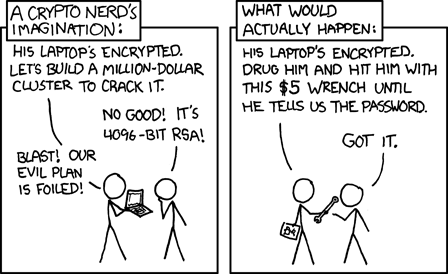
When searching for different security or privacy focused solutions, you will often encounter the idea of a threat model. The purpose of this post is not to specify an associated threat for every listed item.
To simplify things, in general, every layer of security/privacy comes at the price of convenience. It doesn't have to be that way but it is. Depending on the threats you're facing, you might be willing to give up some simplicity in order to gain more security.
Threat modelling is the "science" of choosing the right tools for the right situation when coming to security. You can always get the top-notch security, but is that necessary?
This list does not assume to answer to a specific threat.
Obligatory XKCD by the way:
# Private technologies
Throughout the rest of this post, you can assume the following statements:
- Security through obscurity is not a solution. Whenever you can, always go for an open-source piece of tech. It's easier to trust, audit, and tweak.
- "Privacy" and "security" are mostly written interchangeably.
- Nothing is exhaustive. The list would be even longer and I don't know everything anyways.
- Once the chosen technology is good enough, assume that the weak link in the chain is yourself. Be careful out there.
Chapters below are given in no particular order.
# Operating system
Probably the most important piece of software on your device. Until recently, people didn't even really think about operating systems. Windows used to be the default choice, it is less and less the case.
- Linux: The tried and true operating system which is well enough for most cases. Security depends on distros, but in terms of privacy it's much better than Windows.
- FreeBSD: The biggest open-source alternative after Linux. It's generally well supported and is especially good for desktop environments.
- OpenBSD: Another *BSD kernel. This OS is security-focused and takes it very seriously, it's probably the best one you'll get in that matter. Know that it comes as the cost of less device support and more slowness.
"Only two remote holes in the default install, in a heck of a long time!"
- Windows: Just, don't use it whenever you can. Windows is filled with telemetry, closed-source, worse than ever. It's just a privacy nightmare.
- MacOS: Closed-source and closed ecosystem. Won't say more.
Some privacy focused Linux distros are available as well. These are special purposes and should be used if extreme privacy/security is needed:
- QubesOS: A distribution which separates everything in different VMs for maximum security. It is a heavy distribution and might not work on every system.
- Tails: Meant to be used only in a USB-stick as a temporary OS, Tails uses Tor for every single connection it creates. This is not meant to be used as a daily driver.
- Alpine Linux: While not as privacy focused as the options listed above, it is designed to be small, simple, and secure.
# Web browsing
Sadly there's less diversity when it comes to web browser compared to operating systems. Even though there are many different browsers, there are only really two different backends: Firefox and Chrome.[3]
- Librewolf: A fork of Firefox which significantly improves privacy by default. It is actively maintained and disables many useless or even worrying features.
- Ungoogled Chromium: This one is a bit more complex. Sadly the state of the web today makes it so websites can't be viewed with all browsers. They might even use advanced fingerprinting techniques to proactively disallow specific browsers.
This one is a fork of Chromium, the rendering engine between most browsers nowadays. It tries to remove as many invasive features from Google as possible.
Another interesting concept available in browsers is plugins. These have been heavily limited since the extension Manifest V3 for chromium-based browsers, hence the need for alternatives. Note that adding too many extensions produce a unique fingerprint which can be possibly tracked down as well. These mainly add privacy more than security.
- uBlock Origin: This one is somewhat classic and is basically an adblocker, a really good one though. Ads are already trackers and removing them is a first step to get rid of them overall.
- AdNauseam: While talking about adblockers, this one purposefully clicks ads on your behalf. This renders targeting data useless and is even more aggressive than uBlock.
- NoScript: Disables JavaScript by default and allows you to select which sources you want to activate. It is the most effective way to block unwanted tracking but will break most websites and requires tinkering.
- ClearURLs: Trackers can also be present inside of URLs, for example a video might posess a
?si=...part which tells the website how the video has been shared.
# Instant messaging
When it comes to instant messaging -- and more broadly social medias, which I won't cover -- there are notable aspects to consider. These help choose the appropriate platform.
- Decentralization: the ability for a messaging system to not rely on a single party. This is most commonly implemented as either federation or peer-to-peer. Federation acts like a network, where clients talk to servers and servers talk between each other. P2P removes servers entirely.[4]
- End-to-end encryption: also known as E2EE, is the way messages are encrypted when two parties engage in a private conversation. When a protocol (hence discussion) is end-to-end encrypted, even the server hosting the messages can't know what the users are talking about.
For the following list, a D means Decentralization and a E available E2EE.
- Signal E: Probably the simplest option to use here. It's well fitted for moderate group sizes. Security-wise it might be the best as well.
- matrix DE: An extensible protocol which can be expanded beyond messaging itself. It has many features which are present in modern chatting softwares.
- XMPP DE: It is somewhat close to how
[matrix]works. It's more mature and has been used longer, but can appear older as such. - IRC D: A very simple protocol which predates the world-wide-web itself. It's extremely low on resources, making it very simple to host, but it is quite "primitive".
# Phone
This section would almost require a separate post, but I figured it's useful enough to be put here as well. This blog isn't security-focused so this might be the only post of the subject, it might as well be as useful as possible.
Phones nowadays are in an even closer ecosystem than computers and it makes it very hard to trust them. Still, there are many softwares being developed today to counter this lack of trust.
First, let's go with OSs. When changing the it there is always a risk that some apps such as banking ones won't work.
- GrapheneOS: Certainly the most secure Android-based OS of them all. It features unique privacy focused capabilities and does not mess with security at all. It currently only works on Pixel phones and has very good support for Google Play through its unique sandbox system.
- LineageOS: Another Android-based OS which works on many devices. It features some privacy features as well and is pretty good given the range of devices it supports. It's also good to save some phones from the trash.
- postmarketOS: As opposed to the two OSs above, pmOS is actually based on Alpine Linux. According to Wikipedia it is still intended for power users. It supports hundreds of devices.
The intent of these OSs is generally to "de-google" the phone. Due to the state of the ecosystem, many limitations come with this feature. To install software, there are a few possibilities:
- F-Droid: Certainly the best way to install FOSS on your phone. This supports repositories and is well maintained. This is what I personally use the most and can only recommend it.
- Obtainium: Sometimes software isn't published on F-Droid, in those cases it is possible to download the compiled images directly from their repository on Github, Gitlab, etc. Obtainium automatically manages this and allows many more sources, including F-Droid repositories.
- Aurora Store: A private front-end for Google Play which avoids the creation of a Google account. It works for most cases but can be quite slow or hard to use. Despite this, it is very good.
- Google Play: To use as a last remedy when all the above apps won't work. Try to avoid it as much as you can.
Some apps might require Google Play Services, if you're not on GrapheneOS, try using microG. It is a free software reimplementation of those services.
Finally, here's a list of some applications that can replace those usually provided by Google:
- K-9 Mail: An email client for Android supporting many features.
- CoMaps: An offline map service based on OpenStreetMap data.
- NewPipe: A YouTube viewer allowing to subscribe to channels without requiring an account.
- Aegis Authenticator: A two-factor authenticator supporting migration, as opposed to the default one provided by Google.
- Breezy Weather: A clean weather app supporting multiple providers.
- Feeder: An RSS reader.
- Fennec: A flavor of Firefox for Android which removes as many proprietary blobs as possible. It even supports some plugins listed above.
- Droid-ify: The actual frontend I use to download from F-Droid.
E-mailing is one of the oldeset method of communication available on the Internet. It is used extensively everyday, everywhere, all the time. The hardest thing to find nowadays is good providers, they often aren't free or invite-only.
There's not much to say about providers, I generally take those who are privacy focused. Note that most of them have a far-left connotation, if that's not your thing, skip them. Most of those provide services for non-commercial uses.
You should generally have separated mail addresses for commercial and personal anyways.
- RiseUp: Invite-only, very high quality.
- Disroot: Free and provides many other quality services, closed registration on week-ends. Provides more features through donation.
- 4d2.org: Free and needs a request. Very good. As opposed to the other options this appears to be maintained by an individual and not an organization.
- A/I: Nothing to do with LLMs tough. Request-based. Seems good based on informations seen in other websites.
- Infomaniak: Very corporate but seems clean. Allows paid options for more storage or features.
- cockmail: You read it right. This one is more on the "4-chan" side of the Internet but they don't appear to be jerks either. Free with an automated challenge against bots.
As for softwares, there are a few good options available:
- Thunderbird: This one is mostly recommended for its simplicity of use and acceptable privacy. It is FOSS but is built on a web engine. This adds significant bloat and attack surface.
- KMail: A KDE application which I find very clean like the rest of the DE. It is probably Linux-only like the other options below.
- neomutt: A TUI-based mail client. It requires extensive configuration and the use of other software by embracing UNIX philosphy. An unofficial installer named mutt-wizard is available.
- aerc: Another TUI-based mail-client which can even render HTML mails. It is built by the owner of sourcehut so is already a good thing to me.
# Dark net
Many people I encountered view the "dark net" as something scary and illegal where dangerous things happen. While I can't deny the existence of such content, it's actually a place very similar to the clear net! The main difference between these two is that the clear net relies on the standard internet stack, that is the protocols and means of achieving communication. On the other hand a dark net requires specialized software to decode and interpret the packets received.
There are actually multiple different dark nets, which can be completely separated from the clear one! They often emphasize on anonymity or decentralization.
- Tor: Standing for The Onion Router, it is the most popular dark net. It is commonly used to view the clear web in an anonymized manner. To do so, it relies on nodes[5] and passing each packet to three different nodes. Because each packet is wrapped and encrypted multiple times, it is similar in idea to the layers of an onion.
- I2P: The Invisible Internet Project takes anonymity even more seriously. As opposed to Tor, it is often used as a completely separate network operating on the same physical layer. It is entirely decentralized -- adopting a P2P model -- that is, in an I2P network everyone is a node.
- Hyphanet: Formerly called Freenet, is a P2P network focused on censorship-resistant communication.
- Meshtastic: This one is quite different from the networks listed above. While it is open-source and decentralized as well, it does not require any of the Internet infrastructure. It is much closer to radio and can be an excellent way to communicate when Internet isn't available.
Due to its unique mesh network, Meshtastic may require its own hardware.
A comparative table between different privacy networks is provided on I2P's own website. While potentially slightly biased it does list practical and good information.
Tor provides a browser by default while I2P used to work as a proxy or an extension. Know that you can also run a proxy/node yourself. If you'd rather avoid Java for I2P, a daemon known as i2pd is available and written in C++. A rewrite of Tor in Rust known as arti is currently in the making.[6]
# Firmware and CPUs
This category is mostly present for "educational" purposes. If you wish to change your firmware or hardware, do proceed with extreme caution. Some manipulations can brick your computer thus rendering it
unusable.
Did you know that your CPU is most likely to run its own little operating system in a weirdly isolated environment? This is called the Intel Managment Engine, a completely opaque and proprietary autonomous subsystem which has the quite unique capability of having more power than your own operating system.
It is present on virtually all Intel chips since August of 2015. While you probably don't have to care about it, it had many security vulnerabilities in the past. Moreover, Intel's requirement of a valid cryptographic signature -- otherwise the computer reboots after 30 seconds -- and unconditional presence of this subsystem, begs many questions.
There exists a tool called me_cleaner whose objective is to reduce Intel ME's impact as much as possible.
The issue of untrusted proprietary blobs persists with BIOS as well. Some alternatives exist which partially or even completely remove proprietary firmware:
- coreboot: The biggest free and open-source project which aims at replacing proprietary firmwares. It supports many devices and even has variants -- much like Linux distros -- with specific focuses.
- Libreboot: One variant of coreboot which removes even more proprietary blobs. It simplifies the installation process as well.
If you somewhat do not trust your CPU, prefer more open ISAs such as ARM or RISC-V. x86 is the biggest architecture on desktops and laptops but is deeply proprietary.
If you still do not trust the chip, you can run a softcore on an FPGA. It is basically a chip you can configure on the gate level. It will certainly be slower and more expensive than CPUs, but provides the greatest level of "openness".
If you do not trust your FPGA, you'll have to produce it yourself or inspect it manually. For the latter, great work has been made by bunnie, notably the IRIS Project.[7]
On the topic of trusting, you might not trust your OS because of the sheer size of it. This is especially the case for Linux which is built upon millions of lines of code.
Some OSs such as DuskOS are conceived with the idea that they should be understandable by a single individual. These often provide very unique environments.
# Additional ressources
There are many ressources on the Internet which go into great length about security, privacy, freedom etc.[2] Just to be clear, I do not endose any of their political statement and only provide this list as a mean of finding more information.
While I like redundancy and doing things myself, I do not have the ressources necessary to reproduce all the work done by these people. The primary objective of this post is to give an idea of what is available and the existing issues.
- gettie's space: They used to be more active but still provide some interesting posts on how they tried different OSs. There's not much but I greatly recommend this website.
- LandChad.net: A site providing many guides on how to host platforms and softwares yourself.
- Spyware Watchdog: A pretty complete site classifying many softwares. Its goal is to indicate which one is a spyware, a good software, or something you should be suspicious on.
- Shadow Wiki (on Tor): I mostly link them for their quite complete e-mail page which features a huge table comparing many providers. Otherwise they appear to be a complete jerk so take it with a grain of salt and use this table as a way to find new providers.
From these few ressources I hope you'll find interesting websites. Click on badges and explore! If you wish me to add more links or replace some of them with better alternatives, tell me.
# Closing thoughts
I hope that with this list you will be able to keep your communications secure and private. You shouldn't have to feel watched every time you try to talk to someone close to you, a member of your community, or other people in general.
Hosting software yourself even using old hardware might be the best way to keep privacy, as long as the communications are properly encrypted. FOSS mainly helps in trusting what's running on your computer.
The hardest part will be to convince people to use potentially less user-friendly alternatives to existing proprietary software.
Generally you'll want to share as little information as possible on the internet and keep multiple separate identities, if you care about privacy a lot. This is doable but requires adaptation and appropriate system configuration.
Stay safe out there! You can share, exploit, and download this post as much as you want. Knowledge needs to be shared.
Have a good rest of your day.
Talking about artists as "content creators" is inherently demeaning to me. While those people are creating art or resources to share with others, reducing that to content classifies it as a commodity. While some people are indeed content creators, it would be wrong to group most people as such. ↩
A lot of people who talk about anonymity also like to talk about free speech and how essential it is. While I can't really disagree, this argument is mostly used to justify hateful and intolerant speeches. Never will I stand with such things. ↩ ↩2
While there are many forks which improve privacy, these actually add so much diversity that it would require its own post. I don't plan on making a comparison of web browsers, plenty of them exist already. ↩
Decentralization often implies that you can host it yourself without too much hassle. ↩
A node is a computer hosting specific Tor software which transmits data to the next node. On a Tor network, not all people participating in this network are nodes. This is actually closer to a client-server model. ↩
I explicitely mention other server softwares because I find it to represent a healthy ecosystem. A single point of failure is to be avoided everywhere and this holds for software development as well. ↩
To be honest, when going to these lengths for privacy, it might be better to not use a computer at all! Still, I wish to provide these options because I find them neat and you might have to use one. ↩


